

Table of Contents
A client once told us their maintenance plugin had been running nightly backups for eight months. Nobody had opened one to check. When a plugin update broke the checkout page on a Friday evening, the backup file existed exactly where it was supposed to be. It just would not restore.
That gap between “a backup exists” and “a backup works” is where most website maintenance checklist for business advice quietly stops. This piece covers what a working checklist should include. That means the updates and access checks most guides mention. It also means the two things they usually skip: a backup that has actually been restored, and a current list of who still has the keys to your site.
Key Takeaway: A working maintenance checklist confirms specific tasks were completed on schedule. It does not, by itself, prove a site is secure or fully compliant. Backups need periodic restore tests and account access needs periodic review, not just software updates, for that confirmation to mean anything.
Most Maintenance Checklists Stop at “Backups Exist.” That’s Not Enough

Checking that a backup file exists confirms only that a process ran. It does not confirm the file is complete, uncorrupted, or restorable to a working site. A backup that has never been restored is a theory, not a safeguard, and the difference only becomes visible during an outage.
Most published checklists treat backup verification as a single line item: confirm the backup ran. That is a reasonable first step, but it answers the wrong question. The question that matters is whether the file, if used today, would actually bring the site back. Storage failures, incomplete database exports, and plugin conflicts during the backup process can all produce a file that looks fine in a dashboard and fails the moment someone tries to use it.
This is why a restore test earns its own place on the checklist rather than living inside “check backups” as an afterthought. Skipping it does not remove the risk. It just moves the discovery of that risk from a calm Tuesday afternoon to the middle of an actual outage.
What Should a Website Maintenance Checklist for Business Actually Cover?
A website maintenance checklist for business should cover five areas. These are software and plugin updates, backup verification including a periodic restore test, uptime and performance monitoring, form and functionality testing, and a review of who has admin or editor access to the site. Skipping any one of the five leaves a specific, predictable failure point unattended.
Software updates patch known vulnerabilities and keep the CMS compatible with hosting environments. Uptime monitoring catches outages before a customer reports them. Form testing catches the quiet failures, a contact form that stops forwarding leads, that never show up in an analytics dashboard because nobody submitted anything to notice. Each of these tasks is well covered across the industry.
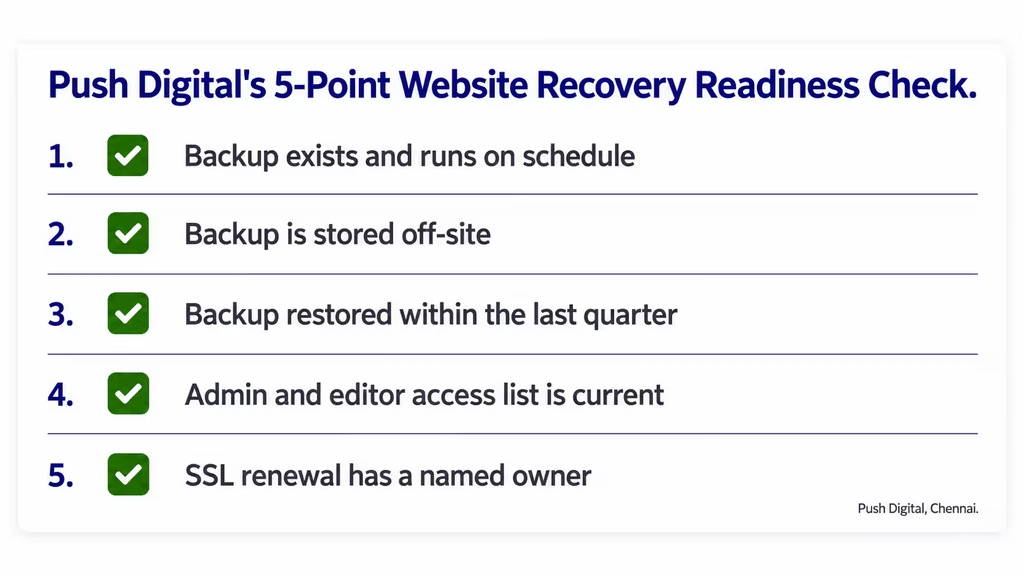
Push Digital’s 5-Point Website Recovery Readiness Check exists because the other two areas are the ones we see skipped most often when we take over maintenance for a new client:
- Backup exists and runs on schedule. Confirmed by checking the backup log or dashboard, not assumed.
- Backup is stored off-site. A backup kept on the same server as the live site offers no protection if that server fails.
- Backup has been restored within the last quarter. Restored to a staging environment, not the live site, and the result checked page by page.
- Admin and editor access list is current. Every account on the list has a name attached to a person who still needs it.
- SSL renewal has a named owner. One person, not “the hosting company,” is responsible for noticing before it lapses.
Each item is deliberately narrow enough to check in a single sitting. A checklist that takes half a day to run is a checklist most businesses eventually stop running.
The Restore Test Most Businesses Skip
Picture a services business whose contact form stops sending inquiries during a routine plugin update on a Wednesday. The team notices two weeks later when a referral mentions they “tried reaching out but never heard back.” A backup from the night before the update exists. Nobody has ever restored one before, so nobody is confident it will work, or how long it will take.
A restore test moves that uncertainty out of an emergency and into a scheduled, low-stakes check. It means taking a recent backup and restoring it to a staging copy of the site, never the live one. Then the result gets checked properly: pages render, the database connects, forms submit, and images display. Quarterly is a reasonable interval for most small business sites; monthly for sites that process payments or store customer data directly.
| What a Restore Test Checks | Why It Matters |
|---|---|
| Staging environment loads without errors | Confirms the backup file is not corrupted |
| Database connects and displays current content | Confirms the database export completed fully |
| Time to complete the restore | Sets a realistic expectation for actual downtime during a real incident |
| Forms and checkout submit correctly | Confirms functionality, not just files, was captured |
The time investment is modest, usually under an hour for a typical business site once the process is documented the first time. The alternative is finding out the backup does not work at the exact moment it is needed most.
Access Creep Is the Maintenance Risk Nobody Audits
Admin and editor access on a business website tends to accumulate rather than shrink. Think of a freelancer from two years ago, a former employee, an agency that finished a project last year. Each was given access for a specific task, and almost nobody goes back to remove it once that task is done. Every account still active is a potential entry point nobody is watching.
Reviewing access does not require a security specialist. It means pulling the full list of user accounts on the CMS and asking, for each one, whether that person or organization still needs that level of access today. Shared logins deserve particular attention. A single “admin” account used by three different freelancers over three years cannot be traced back to any one of them if something goes wrong. A password that has circulated that widely should be treated as compromised, whether or not there is evidence it was misused.
SSL certificate ownership belongs in the same review. Most certificates auto-renew, but “most” is not “all,” and an expired certificate warns away visitors within seconds. Google has treated HTTPS as a search ranking signal since 2014, so a lapsed certificate carries a search cost too. Naming one person responsible for the renewal closes a gap that otherwise sits between the business owner, the hosting provider, and whoever built the site, each assuming someone else is watching it.
Applying This in Chennai and Tamil Nadu: What Local Businesses Get Wrong

Push Digital has been building brands out of Chennai for more than 25 years, and the maintenance conversation with local business owners tends to follow a familiar shape. A website gets built, launched, and handed over, and maintenance is treated as something to think about only if the site breaks. By the time it breaks, nobody remembers who still has admin access or where the last working backup lives.
A T. Nagar retail business running a WordPress catalogue site is a common version of this. The site was built by a freelancer who is no longer reachable. The hosting renewal is on autopay through a card nobody checks, and there has never been a backup restore, tested or otherwise. None of that is unusual. It is simply what happens when maintenance is not assigned to anyone as an ongoing task.
The fix does not require a large retainer. It requires naming one person, whether in-house or outsourced, who owns the checklist and runs it on a schedule. That is the same way payroll or GST filing has an owner, rather than being left to whoever remembers first.
What Drives Website Maintenance Cost for a Small Business?
Website maintenance cost for a small business is driven less by the size of the site and more by four factors. These are platform complexity, whether backups include a tested restore process or just a stored file, how many hours of hands-on monitoring are included, and whether security scanning runs automatically. Published figures for India vary widely because these four factors vary widely across providers.
Industry sources put monthly maintenance for a standard Indian business website somewhere between roughly ₹2,000 and ₹25,000. The figures disagree with each other more than they agree, and most published ranges do not specify whether backup testing or access review sits inside the base package or gets billed separately. That disagreement is itself useful information. A quote well below the low end of any published range is worth asking what has been left out, and a quote well above the high end is worth asking what specifically justifies the premium.
The more useful question is not “what does maintenance cost.” It is “what does this specific package include.” A package that skips a quarterly restore test is doing less than it appears to, regardless of price.
WordPress Maintenance Services vs. Doing It Yourself: When Each Makes Sense
A monthly checklist that takes under two hours is manageable in-house for many small businesses, provided someone is actually assigned to run it. The moment that assumption breaks, WordPress maintenance services start to earn their cost back quickly.
Doing it yourself works when there is a designated owner, a documented schedule, and enough technical comfort to handle a plugin conflict or a failed update without panic. It tends to fall apart quietly: the checklist exists in someone’s notes, that person changes roles or leaves, and nobody picks it back up. Outsourced website maintenance packages solve for that specific failure mode, since the task moves with the provider rather than with an individual employee. The trade-off is cost and a small loss of direct control over exactly when tasks run. For a business without anyone confident running a database restore, that trade-off usually favors bringing in ongoing website support rather than discovering the gap during an outage.
Conclusion
A website maintenance checklist for business only holds up if it includes the two steps most guides leave out: an actual backup restore test and a current review of who has access to the site. Updates and uptime monitoring matter, but they address a different kind of risk than a backup that turns out not to work or an old freelancer’s login still sitting active two years later.
This week, pick one item: pull the current list of admin accounts on your site and confirm every name on it still needs to be there. It takes fifteen minutes and closes a gap that most businesses never think to check until something has already gone wrong. When you are ready for a fuller review, talk to our web team about what a working maintenance schedule looks like for your site specifically.
Frequently Asked Questions
What is included in website maintenance services?
Website maintenance services typically include CMS and plugin updates, backup management, uptime monitoring, security scanning, and content or form testing. The strongest packages also include a periodic backup restore test, which many providers leave out.
How often should a website be maintained?
Most business websites need monthly checks for updates and backups, with a quarterly deeper review of access, SEO basics, and a backup restore test. High-traffic or transaction-heavy sites benefit from more frequent monitoring.
Is website maintenance only a technical task?
No. Content accuracy, form functionality, and admin access review are maintenance tasks too, and none require deep technical skill. Technical tasks like security patching are better suited to a developer or agency.
How do you test a website backup restore?
Restore a recent backup to a staging copy of the site, not the live one, and check that pages load, the database connects, and forms submit correctly. Do this quarterly at minimum for most small business sites.
What’s the difference between a maintenance checklist and a maintenance plan?
A checklist lists the tasks to complete. A website maintenance checklist for business becomes a plan once someone is assigned to run each task on a schedule, with a clear step for what happens if a check fails, such as a backup that will not restore.
How much do website maintenance packages typically cost?
Costs vary by platform complexity and what is included, with Indian sources citing a wide range depending on scope. Ask specifically whether backup restore testing and access review are part of the base package.