Table of Contents
A Chennai boutique clothing brand relaunches its website with a sharper design, better product photography, and genuinely useful content. Three months pass. Organic traffic barely moves. The problem was never the content. Google’s crawler never fully understood the site’s structure, so half the new product pages sat outside the index, invisible to anyone searching for the brand.
This is the pattern behind most stalled small business websites. Technical SEO for small business owners rarely gets attention until growth quietly stops. Technical SEO is not a separate discipline reserved for enterprise teams with in-house developers. It is the plumbing beneath every page, deciding whether search engines can find it, read it, and trust it enough to rank it. For a business running on a tight budget and a template-based WordPress site, fixing this often moves the needle faster than another round of content.
Key Takeaway: Technical SEO for small business means making sure Google can crawl, index, and load your site quickly, not just publishing strong content. Businesses running on shared hosting or template-based WordPress builds usually see the fastest visibility gains once these foundations get fixed first.
What Technical SEO Actually Means

Technical SEO for small business is the set of website changes that help search engines crawl, render, index, and understand pages, separate from the words on the page itself. It covers site speed, mobile usability, secure connections, and structured data. Without it, well-written content can sit unseen because Google never fully processes the page.
Most business owners think of SEO as keywords and blog posts. That is on-page and content SEO, a related but separate layer. Technical SEO instead answers three machine-facing questions: can a crawler discover the page, can it render the page’s real content including anything loaded by JavaScript, and does the page meet baseline trust signals like a secure HTTPS connection? A site can carry excellent content and still rank nowhere if any one of these three breaks down.
Picture two Chennai retailers with near-identical product catalogues. One runs on a theme that generates a duplicate URL for every filter combination, quietly burning crawl budget on pages nobody needs indexed. The other keeps a clean URL structure and a current XML sitemap. Search engines visit both sites a similar number of times, but the second business gets far more of its actual product pages indexed inside the same crawl window. Visibility follows the technical foundation, not the products alone.
The most common mistake we see is treating technical SEO as a one-time setup task instead of ongoing maintenance. A site can pass every check at launch and quietly break six months later when a plugin update changes how images load, or a new page gets added outside the intended site structure. Technical SEO drifts. It needs periodic attention, not a single audit filed away and forgotten.
Why Technical SEO for Small Business Websites Works Differently
Technical SEO for small business sites carries a different risk profile than enterprise SEO: fewer pages to manage, but far less technical oversight, since most small sites run on shared hosting, a purchased theme, and whichever plugins came bundled with the build. A single unoptimised image or an unminified script can drag load times for the entire catalogue, something a larger site’s development team would catch before launch.
Push Digital has been building brands out of Chennai for more than 25 years, and the technical gaps show up in the same handful of places on almost every small business site reviewed: bloated image uploads straight from a phone camera, no caching plugin configured, and a contact form plugin loading its full script library on every page instead of only the contact page. None of these require a developer to fix. They require someone to notice them.
The upside runs the other direction too. A ten-page small business site with clean technical foundations can outcompete a much larger, messier competitor site for local and long-tail queries, because Google is comparing crawl efficiency and page experience, not company size. A restaurant chain with three locations and a tidy site structure regularly outranks a chain of fifteen with a cluttered one. Fixing the plumbing is one of the few SEO levers a small business can pull faster than a larger competitor can react to it.
Tracking the impact does not require an enterprise analytics stack either. Google Analytics 4 paired with Google Search Console gives a small business owner enough visibility to see whether indexed page count, average load time, and organic clicks are moving in the right direction month over month, without paying for a separate enterprise SEO platform.
Technical SEO vs On-Page SEO: What’s the Difference

Technical SEO for small business governs whether a page can be crawled, rendered, and indexed. On-page SEO governs whether that same page, once indexed, matches what a searcher is looking for through its title tags, headings, and body content. One decides if the page is in the race; the other decides how well it runs.
The confusion is understandable because both live inside the same website and both affect rankings. A useful test: if a fix involves the words on the page, the meta description, or the heading structure, it is on-page. If a fix involves server response codes, sitemap files, redirect chains, or how fast the browser paints the page, it is technical.
Neither discipline substitutes for the other. A perfectly optimised product description on a page that returns a slow server response or sits three clicks deep in the site architecture will still underperform. Business owners who invest only in content, without checking whether Google can actually reach and load that content quickly, are optimising half the problem and wondering why results stall anyway.
Crawlability and Indexing: Can Google Even Find Your Pages
Crawlability determines whether Google’s automated bots can discover a page at all, and indexing determines whether that discovered page gets stored and made eligible to appear in search results. A page can be perfectly crawlable and still never get indexed if Google judges it low value or duplicate, which is why both stages need checking separately, not just one.
Google Search Central’s crawling and indexing documentation lays out the mechanics: crawlers follow internal links, read the robots.txt file for access rules, and rely on an XML sitemap to prioritise which pages matter most. A misconfigured robots.txt file is one of the most common small business errors, often blocking an entire section of the site by accident during a redesign.
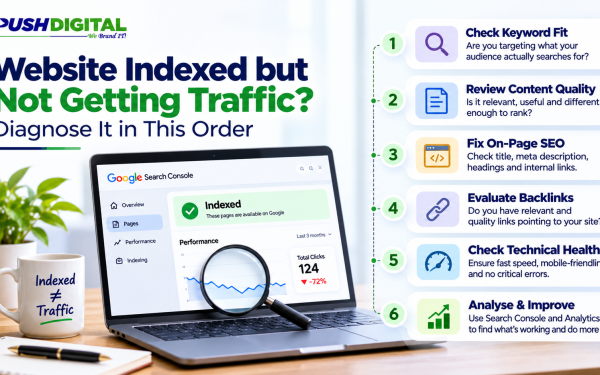
For technical SEO for small business sites specifically, a quick check in Google Search Console’s Pages report shows exactly which URLs are indexed and which are excluded, along with the reason for each exclusion. Reasons like “Discovered, currently not indexed” or “Crawled, currently not indexed” usually point to thin content, duplicate pages, or a crawl budget spread too thin across low-value URLs like tag pages or filtered category views.
Site architecture plays a supporting role here too. A flat structure, where every important page sits within two or three clicks of the homepage, gives crawlers a clear path and concentrates authority on the pages that actually drive enquiries, instead of scattering it across archive pages nobody searches for.
Internal linking reinforces that structure. A homepage linking down to service or category pages, which in turn link across to related products or articles, tells Google which pages the business itself considers important. Orphaned pages, ones with no internal links pointing to them at all, are among the slowest pages on any site to get crawled, indexed, or ranked, regardless of how strong the content on them actually is.
Site Speed and Core Web Vitals: The Metrics That Actually Move Rankings

Core Web Vitals measure how a real visitor experiences a page: how fast the main content loads, how quickly the page responds to a click or tap, and how much the layout shifts while loading. Google uses these as a confirmed ranking signal, and Google’s Core Web Vitals documentation sets the thresholds every site is measured against.
Technical SEO for small business often breaks down on these exact metrics, and for predictable reasons. A hero image uploaded straight from a phone at four megabytes instead of a compressed two hundred kilobytes. A chat widget or booking plugin loading before the page’s actual content. Fonts pulled from three different external services instead of one. Each of these is fixable in an afternoon, yet each one independently drags load time past the point where visitors, and Google, start losing patience.
Mobile matters more than desktop here. Google indexes the mobile version of a site as the primary reference for ranking, and most Indian small business traffic already arrives on mobile networks slower than the office broadband a site was likely tested on. A site that loads acceptably on an agency laptop can still load painfully slowly on the 4G connection most customers are actually using.
A tool like Hotjar or Google Tag Manager’s built-in performance tracking can show exactly where visitors drop off during a slow load, which is often more persuasive to a business owner than a raw Core Web Vitals score. Watching an actual session recording of someone abandoning a cart while a page stalls tends to make the case for fixing site speed faster than any metric on a dashboard.
A Practical Technical SEO Checklist for Small Business Owners
A technical SEO for small business checklist does not need fifty items to be useful. The following covers the checks that catch the majority of visibility problems on sites under roughly two hundred pages, ordered by how much impact each one typically has relative to the effort involved.
| Check | What to Look At | Why It Matters |
|---|---|---|
| Indexing status | Google Search Console Pages report | Confirms which pages are actually eligible to rank |
| Robots.txt file | Accidental blocks on important sections | A single misplaced rule can hide an entire category |
| XML sitemap | Current, submitted, free of broken URLs | Guides crawlers to the pages that matter most |
| Image weight | File size per image, ideally under 200KB | Directly drives Core Web Vitals and mobile load time |
| HTTPS | Padlock icon, no mixed-content warnings | Baseline trust signal for both users and search engines |
| Mobile rendering | Google’s Mobile-Friendly Test | Confirms the mobile version, not desktop, is usable |
| Redirect chains | Old URLs, plugin migrations, domain changes | Multiple hops slow crawling and leak page authority |
| Schema markup | Structured data on products, services, or articles | Helps search engines understand content type and context |
Working through this list once a quarter catches most of the drift that builds up as plugins update, content gets added, and themes change. It also gives a small business owner a concrete way to brief a web design and development partner on exactly what needs attention, instead of a vague “the site feels slow.”
When to Fix It Yourself and When to Bring In a Specialist

Several technical SEO for small business fixes sit well within reach of a non-technical owner: compressing images before upload, submitting a sitemap in Search Console, and installing a reputable caching plugin. Others, like resolving render-blocking JavaScript, restructuring a site’s URL hierarchy, or fixing a crawl budget problem on a large catalogue, genuinely need someone who works in this territory regularly.
The dividing line is usually risk, not difficulty. Compressing an image carries almost no downside if done wrong. Editing a robots.txt file or restructuring URLs without redirects can accidentally deindex an entire section of a live site, sometimes for weeks before anyone notices the traffic drop. That asymmetry is the real reason to bring in a specialist for structural changes even on a modest budget.
The business impact of getting this wrong compounds quietly. A small business that loses three months of indexing on its main category pages is not just losing rankings for that quarter. It is losing the accumulated crawl trust and click history search engines use to judge future updates, which means recovery often takes longer than the original mistake took to make. Treating technical SEO as routine maintenance, not a one-off fix, is what keeps that risk from building up in the first place.
A useful middle path: run the checklist above internally every quarter, and bring in outside support specifically for anything that touches site architecture, redirects, or a full technical SEO and digital marketing audit. That keeps routine maintenance in-house while reserving the higher-risk work for someone who has done it enough times to know where the mistakes hide. Reviewing a few completed website projects beforehand is a reasonable way to judge whether a prospective partner actually understands this layer or just lists it as a service line.
Frequently Asked Questions
What is technical SEO in simple terms?
Technical SEO for small business covers the behind-the-scenes work letting search engines find, load, and understand a website. Without it, good content often stays invisible.
Why does technical SEO matter if my content is already good?
Strong content only ranks if search engines can crawl and index the page carrying it. A slow, poorly structured site can bury even the best-written page beyond where anyone will find it.
What’s the difference between technical SEO and on-page SEO?
Technical SEO decides whether a page can be crawled and indexed. On-page SEO decides whether that indexed page matches what a searcher is looking for. Both are needed, neither replaces the other.
How do I check if my website has technical SEO issues?
Checking technical SEO for small business starts with Google Search Console’s Pages report and a mobile-friendly test. Both are free and quickly reveal indexing and speed problems worth fixing first.
Is technical SEO still relevant with AI-powered search?
Yes. AI search tools rely on the same crawled and indexed content Google uses, so a site blocked from proper crawling stays just as invisible to AI-generated answers as it does to standard search results.
How often should technical SEO be reviewed?
A quarterly review catches most drift from plugin updates, new content, and theme changes. Larger sites or ones adding pages frequently benefit from a lighter monthly check instead.
Conclusion
Technical SEO for small business websites is rarely glamorous work, but it is usually the fastest path back to visibility when growth has quietly stalled. Start this week with the checklist above: confirm your indexing status in Search Console, compress your heaviest images, and run a mobile-friendliness test. Those three checks alone surface most of what is holding a small business site back.
Once the basics are in order, the returns tend to compound with everything else the site does, from content to paid campaigns. If auditing all of this feels like more than a quarter-hour job, talk to Push Digital about your website and get a clear view of what is actually blocking your visibility before spending on anything else.