

Table of Contents
Take a textile showroom in T. Nagar that launched a new site three months ago. The owner searches the shop’s own name and finds a marketplace listing and an old Facebook page, but not the website. Calls have not increased, and the web developer says to be patient. When a website is not ranking on Google, patience is sometimes the right answer, but more often a specific, fixable fault is holding the site back.
This guide lists ten of those faults in the order worth checking them, with a quick test and a fix for each. It also covers the local signals that matter to Chennai businesses, which most generic guides skip. The guide closes with a seven-step checklist from Push Digital, a Chennai-based 360° branding and digital marketing agency.
Key Takeaway: Most stalled sites fail for one of ten reasons, and the first two to rule out are indexing blocks and a page format that does not match the search. Fix those before touching content or links. This guide is for small business owners and marketing managers whose sites are live but quiet.
When Your Website Is Not Ranking on Google, Check Indexing First
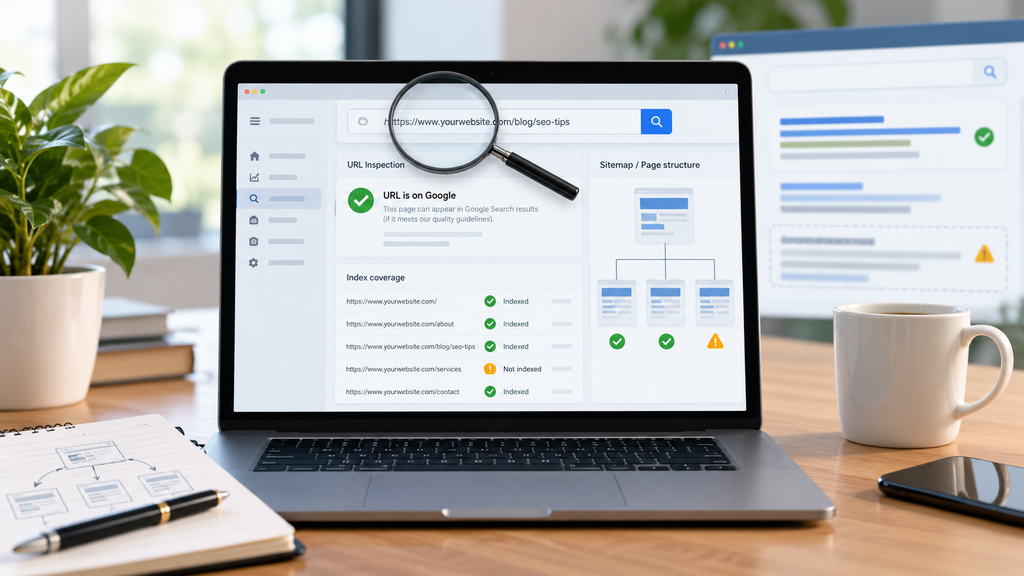
Before you rewrite a single page, find out whether Google has the page at all. Many cases where a website is not ranking on Google turn out to be indexing failures, and the two problems need different fixes. A page that is missing from the index cannot rank for anything, however well it is written.
Run a quick test. Type site’s domain, yourdomain.com/exact-page-url, into Google. If the page appears, it is indexed, and your problem is ranking. If nothing appears, open the URL Inspection tool in Google Search Console, which shows whether Google has crawled the page and what it found there. The check takes about five minutes.
| What you see | Most likely reason | First place to check |
|---|---|---|
| Page missing from site: search | Indexing block or no discovery | URL Inspection in Search Console |
| Indexed but absent from results | Intent or depth mismatch | Page one results for your phrase |
| Ranks only for your brand name | Weak content or few links | Search Console performance report |
| Ranked well, then dropped | Policy issue or competitor gain | Search Console manual actions report |
| Missing from Maps and local results | Local profile problems | Your Google Business Profile |
Work down the table from top to bottom, because each row assumes the row above is clear. The ten reasons below follow the same order.
Why Won’t Google Index Your Pages?
Why is my website not showing up on Google? Usually because a noindex rule or a robots.txt block tells Google to stay away, or because Google has no route to the page through a sitemap, a Search Console property, or internal links. Fix the block first, then give Google a path to the page.
Reason 1: A noindex Tag or robots.txt Rule Is Shutting Google Out
A noindex rule, set in a meta tag or an HTTP header, tells Google to drop a page from its results. It often survives from a staging site. Many WordPress installs also have a setting that discourages search engines, and it sometimes stays ticked after launch.
Here is the trap. A page blocked by robots.txt never has its noindex rule read, so Google can still show the page if other pages link to it. Google also does not support a noindex rule written inside robots.txt itself. The noindex guidance in Google Search Central explains both points, so read it before changing anything. Then confirm your fix with the URL Inspection tool.
A newer version of the same mistake is AI crawlers blocked in robots.txt by broad bot-blocking rules or CDN settings. If you want your pages cited in AI answers, review which user agents your rules name, using each vendor’s own documentation.
Reason 2: Google Has No Route to Your Pages
Google finds pages by following links and reading sitemaps. A new site with no XML sitemap, no Search Console property, and no internal links to its deeper pages gives Googlebot very little to follow. Pages that nothing links to are often called orphan pages, and they may never be discovered.
Submit your sitemap in Search Console, then link every service page from your main menu or from a related page. The Google Search Console indexing report then lists the URLs Google found but chose not to index, which is your to-do list.
Content Problems: Intent, Depth and Keyword Choice
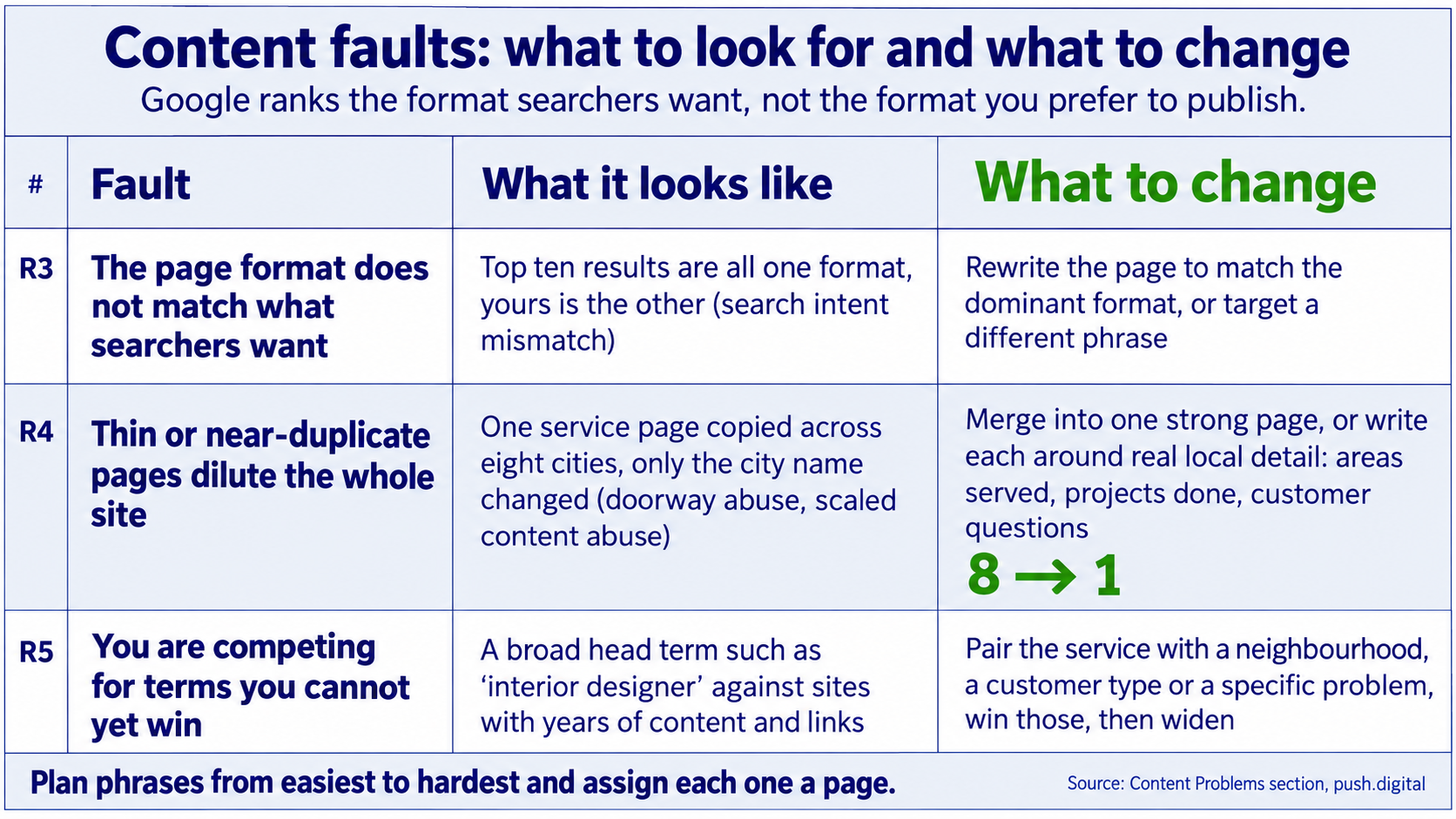
A page can be well written and still be wrong for the query. Google ranks the format searchers want, not the format you prefer to publish.
Reason 3: The Page Format Does Not Match What Searchers Want
Search your target phrase in a private window and read the top ten results. If they are all service pages and you wrote a blog post, or the reverse, you have a search intent mismatch. Either rewrite the page to match the dominant format, or target a different phrase for the content you already have. A service page and a blog post can both belong on the site. They just should not compete for the same query.
Reason 4: Thin or Near-Duplicate Pages Dilute the Whole Site
Consider a manufacturer in Ambattur whose site has one service page copied across eight cities, with only the city name changed. Google’s spam policies list doorway abuse, which includes substantially similar pages aimed at specific cities, and scaled content abuse, which covers many pages made mainly to rank. Eight near-identical pages give Google reasons to doubt the other pages on the same site.
Merge them into one strong page, or write each location page around real local detail: the areas served, the projects done, the questions customers in that area ask.
Reason 5: You Are Competing for Terms You Cannot Yet Win
A new brand that targets a head term such as “interior designer” faces established sites with years of content and links behind them. If your website is not ranking on Google for a broad phrase, the fix is often a narrower phrase, not more pages. Pair the service with a neighbourhood, a customer type or a specific problem, win those searches, then widen.
A good plan lists phrases from easiest to hardest and assigns each one a page. That is the kind of planning covered by digital marketing support for Chennai businesses.
Speed and Mobile Problems Google Measures Directly
Google’s Core Web Vitals guidance sets three targets: Largest Contentful Paint within 2.5 seconds, Interaction to Next Paint under 200 milliseconds, and Cumulative Layout Shift below 0.1. The same page says these metrics measure real-world user experience and align with what Google’s core ranking systems seek to reward.
Reason 6: Pages Fail Core Web Vitals
Start with the Core Web Vitals report in Search Console, which shows how groups of pages perform for real visitors. Then test single pages in PageSpeed Insights. Oversized images, autoplaying hero video and stacked third-party scripts are common causes of a slow Largest Contentful Paint on small business sites. Speed is decided at design stage, long before hosting is chosen. Push Digital has been building brands out of Chennai for more than 25 years. A banner or video that looks right on an office monitor but loads slowly on a mobile network is a design flaw, and the repair starts with the file, not the server.
Reason 7: The Mobile Page Is the Page Most People Actually See
Open your own site on a phone and try to do what a customer would do: find the service, read the price or process, and call. A menu that hides key pages, text too small to read, buttons set too close together, or a layout that jumps as images load will push visitors back to the results page.
Content or links that exist only on the desktop layout may also be missing from what Google reads on a phone. Confirm that the mobile page carries the same text, headings and links as the desktop page.
Authority and Policy: Links, Trust and Rule Violations

Say a D2C skincare brand publishes well-structured pages and fixes its speed, yet still sits below three competitors whose names appear across blogs, directories and news sites. The content is not the gap. The gap is evidence that anyone else vouches for the brand, and a site where the website is not ranking on Google for that reason will not move until that evidence exists.
Reason 8: Competitors Out-Earn You on Links and Citations
Links from other sites work like references. When the pages above you have many more referring domains than you do, further on-page tweaking narrows the gap only a little. Look at who links to the top three results, using a backlink tool such as Ahrefs or Semrush, then list the links you could honestly earn.
Realistic sources for a local business include trade associations, supplier and client pages, local news and community sites, and original data that you publish and others want to cite.
Reason 9: A Spam Policy Breach or Manual Action Suppresses the Site
Google’s spam policies name specific tactics: buying links that pass ranking credit, keyword stuffing, scaled content abuse and doorway pages, among others. Sites that break them can rank lower or disappear from results.
If a drop followed a link package or a batch of mass-produced pages, open the manual actions report in Search Console. A manual action appears there with its reason, and you can fix the issue and ask for a review. If the report is empty, return to the earlier reasons on the list.
Why Is Your Chennai Business Missing From Local Results?
Chennai businesses go missing from local results when their Google Business Profile is incomplete, or when the name, address and phone number differ between the profile, the website and directory listings. Mismatched details make it harder for Google to confirm the business is one real place, so fix them before adding content.
This is the tenth reason on the list, and the one most generic guides leave out. Think of a clinic in Anna Nagar whose Google Business Profile lists one phone number, whose website footer lists another, and whose directory entries use an old address. A searcher nearby sees a competitor with matching details ranked ahead. That is a website not ranking on Google Chennai problem that no amount of blog writing will solve.
Fix the profile in this order. Choose the right primary category, add every service you offer, set accurate hours, upload real photos, and reply to reviews. Then make the contact page on your website match the profile exactly, character for character.
Language matters too. Customers in Chennai search in English, in Tamil and in a mix of both. A page written only in English, with no Tamil version of the business name or the area names, may miss searches typed the other way. Test a handful of queries in both scripts yourself and see who appears. Businesses that want help with listings and on-site content can look at Push Digital’s search-led digital marketing services.
How Long Before You Should Worry, and What Do You Fix First?
How long does it take to rank on Google? Figures range from a few weeks to over a year because they measure different things: first indexing, first impressions, or page-one position for competitive terms. If the page is indexed and clean, give it time. If it is not indexed, time will not help.
Advice that quotes a few weeks usually describes how long Google takes to find a new page. Advice that quotes many months describes competing for crowded commercial phrases against sites with years of links. Some agency posts also describe a fixed “sandbox” period for new sites, but they present it as an observation, not as a rule Google has published.
A practical rule follows. If your website is not ranking on Google after a few months, check three things. The page must be indexed, match the search intent and pass Core Web Vitals. If all three hold, stop waiting and revisit the reasons on competition and links.
Push Digital’s 7-Step Ranking Diagnosis puts the ten reasons into an order you can work through on any stalled site. Use it to find the fault before spending on content or links:
- Confirm the page is indexed with a site: search and the URL Inspection tool.
- Rule out noindex tags, robots.txt rules and blocked crawlers.
- Match the page format to the top ten results for your target phrase.
- Test depth and duplication, then merge or expand thin and near-identical pages.
- Read the Core Web Vitals report and fix the slowest page template first.
- Compare referring domains with the three pages ranking above you.
- Check that your Google Business Profile, website and listings carry identical business details.
When steps 5 or 7 expose problems in the page template itself, the repair belongs in the site’s design and build. That is the work covered by Push Digital’s web design and development service.
Frequently Asked Questions
Why is my website not showing up on Google at all?
The usual causes are a noindex tag, a robots.txt block, or no route for Google to find the page. Check the URL Inspection tool in Search Console first.
How long does it take for a new website to rank on Google?
It depends which milestone you mean. Indexing comes first and shows in Search Console, while page-one positions for competitive phrases come later, so judge progress in that order.
Can I rank on Google without backlinks?
Yes, for narrow and local phrases where few competitors hold many links. For competitive commercial terms, rivals with far more referring domains usually need to be matched.
Do I need Google Ads to rank organically?
No, because ads and organic results are separate, and paid campaigns do not create organic rankings. Ads can still bring traffic while the fixes in this guide take effect.
How do I check if Google has indexed my page?
Search site: followed by the page address, then confirm in the URL Inspection tool in Google Search Console. If the page is missing, check for noindex rules and robots.txt blocks.
Why is my website not ranking even after doing SEO?
Usually the work targeted the wrong problem, such as new content on unindexed pages or phrases too competitive to win yet. Run the seven-step diagnosis before adding more.
Conclusion
When your website is not ranking on Google, start with indexing and work down the list in order. Most stalled sites turn out to have one or two faults that explain the silence, and the faults at the top of the list are the cheapest to fix.
This week, run the site: test on your five most important pages and write down which ones Google has not indexed. Then open Search Console, read the indexing and Core Web Vitals reports, and mark each step of the seven-step diagnosis as clear or open. If the open steps involve design, local listings or content planning, talk to our brand team about what a fix would involve. Change one thing at a time so you can see which change moved the result.